Chapter 1: The Mobile Development Landscape
This chapter gives you the big picture: where the market is heading, which technology models dominate, why architecture and state management matter, and what order to learn things in before you start building in the chapters that follow.
1.1 Mobile Development Market Trends
1.1.1 The Rise of Cross-Platform Development
Cross-platform development has become the dominant approach over the past several years. Frameworks like Flutter and React Native are increasingly favored because they offer:
- Lower cost: One codebase for both iOS and Android reduces spend by 40–60% compared to maintaining two separate native teams
- Faster time-to-market: 3–4 months to MVP on average, versus 6–8 months for native development
- High code reuse: 90–95% of business logic can be shared across platforms
- Near-native performance: Recent engine improvements let cross-platform apps reach 85–95% of native performance
1.1.2 Key Trends
🏪 Super Apps
Definition: A single app that bundles many services (e.g., Grab, WeChat, Zalo).
Characteristics:
- Bundles multiple micro-services: ride-hailing, food delivery, e-wallet, e-commerce
- Modular monorepo architecture with independent deployment per module
- Requires rigorous regression testing whenever a core module changes
- Challenges: battery drain, app size (>100MB), cold-start time
Real examples:
- Grab (Southeast Asia): rides, food delivery, e-wallet, all in one app
- WeChat (China): messaging, payments, mini-programs, services
- Zalo (Vietnam): grew from a chat app into a super app with ZaloPay, Zalo AI, and Mini Apps
These three examples span three different markets — a useful reminder that the super-app pattern is a global phenomenon, not a regional one.
🤖 AI Everywhere
AI use cases inside mobile apps:
- Personalization: ML Kit, on-device recommendation models — product suggestions, content feeds
- Image enhancement: on-device ML (TensorFlow Lite) — beautification filters, background removal
- Chatbots: LLM APIs (Claude, OpenAI, Gemini) — 24/7 customer support
- Voice assistants: speech-to-text — voice commands
Trade-offs:
- ✅ On-device ML: private, works offline, no API cost, but limited model complexity
- ✅ Cloud AI: powerful, always up to date, but comes with API cost and latency
📱 Cross-Platform Goes Mainstream
Why businesses are moving to cross-platform:
| Comparison | Native Development | Cross-Platform Development |
|---|---|---|
| Team size | 2 teams (iOS + Android) | 1 team (Dart/JS) |
| Time to MVP | 6–8 months | 3–4 months |
| Annual cost | $200K–300K | $100K–150K |
| Maintenance | High (2 codebases) | Medium (1 codebase) |
| Code reuse | 0% | 90–95% (business logic) |
Return on investment:
- Development cost reduction: 50–60%
- Time savings: ~50%
- Code reuse: 90–95% of business logic
⚡ Low-Code / No-Code Platforms
Popular platforms: FlutterFlow, Bubble, Glide, Adalo
Strengths:
- Prototype in 1–2 weeks
- Non-technical founders can build MVPs themselves
- Drag-and-drop UI builders
Limitations:
- ❌ Complex custom logic is hard to implement
- ❌ Performance issues at scale with large datasets
- ❌ Vendor lock-in (hard to export code)
- ❌ Scaling limitations
Practical use:
- Prototype stage: use low-code to validate an idea fast
- Production stage: rebuild with native/cross-platform code
📴 Offline-First & PWA
Why offline-first matters:
Data points (Google):
- 53% of users abandon a site if it takes more than 3 seconds to load
- 70% of users in emerging markets experience unstable connectivity
- PWAs can increase engagement by up to 136% (AliExpress case study)
Offline-first architecture:
- Cache first: return cached data immediately
- Network request: fetch fresh data in the background
- Cache update: refresh the cache when new data arrives
- Fallback: show cached data if the network request fails
1.1.3 Job Market Snapshot
Opportunities:
- React Native: high demand, large community, average salary $90K–130K
- Flutter: fastest-growing (+15% YoY), average salary $80K–120K
- Native iOS/Android: still stable but growth is flattening
Advice:
- Beginners often start with React Native — easier hiring, JS skills transfer elsewhere
- Flutter suits developers who want to specialize in mobile
- Native iOS/Android is for apps that demand maximum performance
1.2 Native vs. Hybrid vs. Cross-Platform vs. PWA
1.2.1 Detailed Comparison
| Criterion | Native (Swift/Kotlin) | Hybrid (Capacitor) | Cross-Platform (Flutter/RN) | PWA |
|---|---|---|---|---|
| Language | Swift, Kotlin | HTML/CSS/JS (existing web app) | Dart (Flutter), JS/TS (RN) | HTML/CSS/JS |
| Rendering | Native UI | WebView (native shell) | Flutter: Skia canvas RN: native bridge |
Browser engine |
| Performance | ⭐⭐⭐⭐⭐ (100%) | ⭐⭐⭐ (60–70%, better than legacy Cordova thanks to modern WebViews) | ⭐⭐⭐⭐ (85–95%) | ⭐⭐⭐ (70–80%) |
| UI smoothness | 60fps guaranteed | 40–55fps average | 55–60fps (near native) | 45–60fps (browser-dependent) |
| Bundle size | iOS: ~20MB Android: ~15MB |
~8–12MB (web + native shell) | Flutter: ~6–8MB RN: ~5–7MB |
~1–3MB (cached) |
| Dev cost/year | $200K–300K | $60K–100K | $100K–150K | $50K–80K |
| Team size | 2 teams (4–6 devs) | 1 team (2–3 devs, reuses an existing web team) | 1 team (3–4 devs) | 1–2 devs |
| Time to MVP | 6–8 months | 2–3 months (if a PWA already exists) | 3–4 months | 1–2 months |
| Hardware access | ✅ Full access | ✅ Good, via official plugins (Camera, Geolocation, Push, Filesystem…) | ✅ ~90% via plugins | ❌ Very limited (no Bluetooth on iOS, no NFC, no background sync) |
| App store | ✅ Yes | ✅ Yes (a real native build, not rejected like plain WebView wrappers) | ✅ Yes | ❌ No (unless wrapped) |
| Push notifications | ✅ Full support | ✅ Full support via plugin | ✅ Full support | ⚠️ Android only |
| Offline capability | ✅ Native SQLite | ✅ Inherits Service Worker/IndexedDB from the underlying PWA | ✅ Full (SQLite + sync) | ✅ Service Worker |
| Update cycle | 1–7 days (review) | 1–7 days (review), though the web layer inside can be live-updated | 1–7 days (review) | Instant (push code, done) |
| Learning curve | High (new language) | Very low (reuses 100% of web skills) | Medium (Dart/JS + platform knowledge) | Low (web skills) |
| Community size | Large (platform-specific) | Medium, growing fast (replacing Cordova) | Large (growing fast) | Medium |
| Hiring ease | Medium | Easy (any web developer can do it) | Medium–easy | Easy |
| Best for | AAA games, AR/VR, hardware-heavy apps | Upgrading an existing PWA into app stores fastest, MVPs, web-only teams | Most business apps, startups, SMBs | Content sites, MVPs, markets with poor connectivity |
💡 Capacitor vs. Cordova/Ionic (the previous generation): Capacitor (built by the Ionic team, released 2019) is the modern successor to Cordova — it uses the operating system's latest WebView instead of bundling an outdated one, exposes a Promise/async-based plugin API instead of callbacks, and works cleanly with any JS framework, not just Angular (as classic Ionic required). This book uses Capacitor, not Cordova — see Chapter 3.
1.2.2 Decision Framework
How to choose the right technology:
1. Native (Swift/Kotlin) — choose when:
- You need AR/VR or a heavy 3D game
- You have a large team and a large budget
- Maximum performance is priority #1
2. Hybrid (Capacitor) — choose when:
You already have a working PWA or web app and need to reach app stores fast, without a rewrite
Your team only has web skills — no budget or time to pick up Dart or React Native's native-module ecosystem
You're validating an MVP under budget pressure and can tolerate slightly-less-than-native UI smoothness
You don't need deep custom animation or heavy native-hardware access beyond what official plugins cover
→ Covered in full in Chapter 3, where we wrap the Chapter 2 PWA project into a native shell.
3. Cross-platform (Flutter/React Native) — choose when:
Building most kinds of business apps
Medium team/budget
You need a presence on the App Store/Play Store
Choose React Native if:
- Your team already has JavaScript/React skills
- You want to leverage the npm ecosystem
Choose Flutter if:
- Your team is willing to learn Dart
- You need highly custom UI and complex animation
- You want one truly unified codebase (mobile + web + desktop)
4. PWA — choose when:
- You don't need an App Store/Play Store presence
- Your target market has poor connectivity
- Building content sites or MVPs
- Fastest possible time-to-market matters most
1.2.3 Real-World Case Studies
Spotify PWA
- Challenge: music streaming needs fast loading and offline playback support
- Solution: a PWA with caching strategies and Service Workers for offline playback
- Results:
- 30% faster on mobile
- Offline mode for premium users
- Increased engagement in markets with poor connectivity
- Tech: Service Workers, Cache API, Web Audio API
Source: Spotify Engineering Blog — Web Player
Alibaba (Flutter)
- Challenge: unify iOS and Android teams, reduce duplicated effort
- Solution: migrated the Xianyu app (500M+ users) to Flutter
- Results:
- 50% reduction in development time
- 90% code reuse across platforms
- Native-comparable performance (60fps)
- Bundle size: reduced from 15MB to 8MB
Source: Flutter Case Study — Alibaba
Discord (React Native)
- Challenge: fast iteration, cross-platform feature parity
- Solution: React Native for the core app (iOS/Android)
- Results:
- 95% code reuse
- Weekly release cadence
- Native-like performance with bridge optimizations
Source: Discord Engineering Blog — React Native
Burger King (Capacitor)
- Challenge: Burger King's design team runs a strict, custom design system across web, TV ads, in-store menus, and mobile — the mobile app needed to look and feel identical to the brand's own UI library, not generic iOS/Android components
- Solution: Capacitor, so the team could bring their existing web-based UI library to mobile directly, instead of rebuilding it with native components
- Results:
- iOS and Android apps feel fully native to users, while every visual element stays pixel-consistent with the brand's design system
- No native UI rebuild needed — the same web component library ships to web and mobile
- Tech: Capacitor, custom web UI library
Source: Ionic — Burger King's Mobile Design System and Brand Consistency
1.3 Application Architecture Overview
1.3.1 Why Good Architecture Matters
Problems with unstructured code:
- ❌ Business logic tangled with UI code
- ❌ Logic can't be tested in isolation
- ❌ Hard to maintain as the app grows
- ❌ Code can't be reused elsewhere
- ❌ Teamwork becomes difficult
Solution: split code into three layers
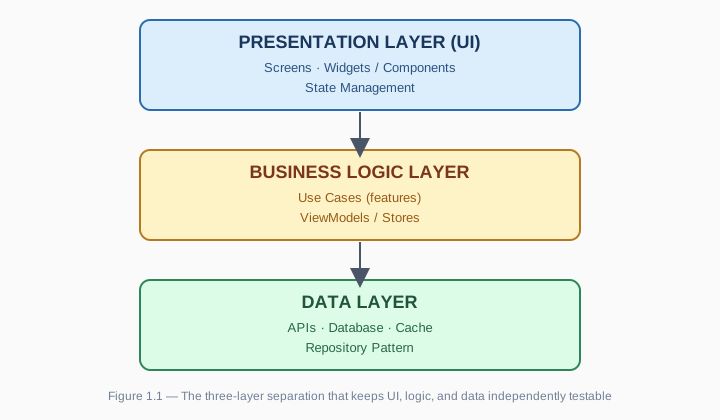
Benefits of good architecture:
- ✅ Each layer is testable in isolation
- ✅ Easier to maintain and scale
- ✅ Effective teamwork — each person can own a different layer
- ✅ Less technical debt
1.3.2 What Is State Management?
State = the data in your app that changes over time. Examples:
- User login/logout
- Cart items in a shopping app
- Theme (dark/light mode)
- Loading states, error messages
Three kinds of state:
1. Local/Ephemeral State
- A single widget/component's internal state (e.g., whether a checkbox is checked)
- →
setState/useStateis enough
2. App State
- User profile, settings, cart items
- → needs a state management library
3. Shared State
- Notifications, network status, location
- → needs a global state solution
When do you need a state management library?
| App size | Complexity | Suggested solution |
|---|---|---|
| 1–3 screens | Simple (1–2 states) | setState, useState |
| 3–10 screens | Medium (3–5 states) | Provider, Context API, Zustand |
| 10+ screens | Complex (5+ states) | Riverpod, Redux Toolkit, BLoC |
| Team development | Very complex | Redux Toolkit, BLoC |
💡 Note: Chapter 6 covers this in depth — MVVM, Clean Architecture, Repository Pattern, Dependency Injection, testing strategies, and real code examples.
1.4 Recommended Learning Path
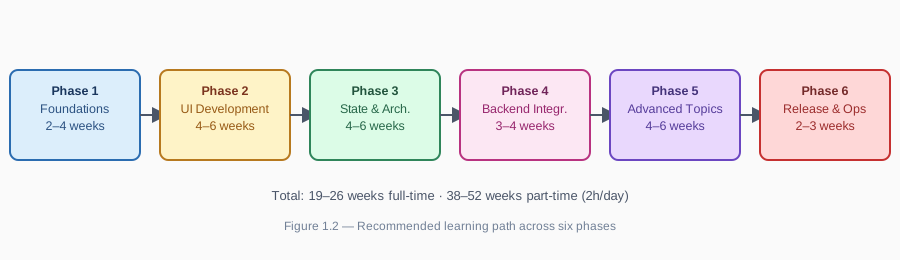
The six phases below are a generic roadmap — they apply whether you're self-teaching from scratch or just want a mental model. This book itself follows a more specific, opinionated path across four different technologies, in this exact order:
| This book's chapter | Maps to phase(s) below | Duration in the book |
|---|---|---|
| Ch. 2 — PWA | Phase 1 + Phase 2 (first pass) | 2 chapters' worth |
| Ch. 3 — Capacitor | Bridges Phase 2 → Phase 6 (it's a short, ~1-chapter add-on that wraps your finished PWA into an installable app — not a full multi-week phase like the other three stacks) | 1 chapter |
| Ch. 4 — React Native | Phase 2 + Phase 3 (second pass, new stack) | 3 chapters' worth |
| Ch. 5 — Flutter | Phase 2 + Phase 3 (third pass, new stack) | 3 chapters' worth |
| Ch. 6 — Architecture & Patterns | Phase 3 (architecture patterns built on top of whichever state library you chose — not "more advanced state options") | 1 chapter |
| Ch. 7 — Backend & Services | Phase 4 | 1 chapter |
| Ch. 8 — AI in Mobile Apps | Phase 5 (subset) | 1 chapter |
| Ch. 9 — Release & Operations | Phase 6 | 1 chapter |
| Ch. 10 — Capstone | All phases combined, applied to a project you choose | 1 chapter |
| Ch. 11 — Conclusion | Wrap-up and next steps; not tied to a single phase | 1 chapter |
| Extension E1 — IoT | Outside the 15-week core path — self-study add-on covering device sensors and Bluetooth | Optional |
| Extension E2 — AI Coding Agents | Outside the 15-week core path — self-study add-on on using AI coding agents responsibly | Optional |
Why Capacitor doesn't get its own "phase": unlike Flutter or React Native, Capacitor doesn't require learning a new UI framework, a new language, or a new state-management model — it wraps the PWA you already built in Chapter 2. That's precisely why it's fast to learn and a common real-world choice when a team needs to ship to app stores without a full rewrite (see the decision framework in §1.2.2). In the phased model below, treat Capacitor as a short checkpoint at the end of Phase 2, not a phase of its own.
1.4.1 Learning Path Overview
Phase 1: Foundations (2–4 weeks)
- Dart/JavaScript fundamentals
- Git & GitHub
- Setting up the development environment
- Basic CLI commands
Phase 2: UI Development (4–6 weeks)
- Widget/component basics
- Layout systems (Flex, Grid, Stack)
- Navigation & routing
- Form handling
- Theming & styling
Phase 3: State & Architecture (4–6 weeks)
- State management concepts
- Provider/Context/Zustand
- Riverpod/Redux (advanced)
- MVVM/Clean Architecture
- Repository pattern
Phase 4: Backend Integration (3–4 weeks)
- REST API integration
- Authentication (JWT, OAuth)
- Local storage (SQLite, SharedPreferences)
- Offline-first & sync
- Error handling & retry
Phase 5: Advanced Topics (4–6 weeks)
- Push notifications
- Background tasks
- Testing (unit, widget, integration)
- Performance optimization
- Security best practices
Phase 6: Release & Ops (2–3 weeks)
- Build & signing
- Store submission
- CI/CD basics
- Monitoring & analytics
- Crash reporting
1.4.2 Phase Details
Phase 1: Foundations (2–4 weeks)
Goal: get comfortable with the core language and tooling.
| Topic | Flutter | React Native | PWA | Capacitor |
|---|---|---|---|---|
| Language | Dart basics | JavaScript/TypeScript | JavaScript/TypeScript | JavaScript/TypeScript (reuses your PWA) |
| Environment | Flutter SDK, Android Studio, Xcode | Node.js, Expo CLI | Node.js, VS Code | Node.js, Android Studio (Xcode optional, macOS only) |
| Version control | Git fundamentals | Git fundamentals | Git fundamentals | Git fundamentals |
| CLI commands | flutter run, build, test | expo start, npm run | npm run, serve | npx cap sync, npx cap open android |
Resources:
Practice: build a simple counter app.
Phase 2: UI Development (4–6 weeks)
Goal: build responsive UI, navigation, and forms.
Skills to learn:
- ✅ Widgets/components: text, button, image, list, card
- ✅ Layout systems: row, column, stack, flex, grid
- ✅ Navigation: stack navigator, tab navigator, deep linking
- ✅ Forms: validation, error handling, submission
- ✅ Theming: colors, typography, dark mode
Practice projects:
- Week 1–2: a to-do app (CRUD with local state)
- Week 3–4: a data-driven list app (API consumption, list views)
- Week 5–6: a product listing screen (complex UI, images, filters)
Checkpoint — Capacitor: once your PWA from Phase 1–2 is working, this is the natural point to wrap it with Capacitor and get a real, installable app on your phone (Chapter 3). It's a one-time setup plus swapping a handful of browser APIs (camera, geolocation) for their Capacitor plugin equivalents — expect roughly a week, not a new multi-week phase.
Resources:
Phase 3: State & Architecture (4–6 weeks)
Goal: manage state effectively and organize your code.
State management — two separate tracks, in the order the book actually teaches them (not one merged timeline, as an earlier draft of this roadmap implied):
React Native track (Chapter 4, §4.6):
useState+ Context API — local state and simple tree-sharing, taught together as one step- Zustand — lightweight global state
- Redux Toolkit — complex state, larger teams
Flutter track (Chapter 5, §5.5):
setState— the simplest local state- InheritedWidget — the underlying mechanism Provider is built on
- Provider — recommended for most apps
- Riverpod — "Provider 2.0," the most modern option
⚠️ BLoC is name-checked in a comparison table in Chapter 5 as an enterprise option, but this book does not teach BLoC implementation in depth. If you need it, see the official docs at bloclibrary.dev.
Architecture patterns (Chapter 6 — built on top of whichever state library you picked above, not "more advanced state management"):
- ✅ MVVM: Model-View-ViewModel
- ✅ Repository pattern: abstract data sources
- ✅ Clean Architecture: separation of concerns
- ✅ Dependency Injection & testing strategies
Practice: refactor the Room Booking project (Chapter 4) or the Receipt OCR project (Chapter 5) using the progression you just learned for that track.
Phase 4: Backend Integration (3–4 weeks)
Goal: connect to APIs, handle authentication, and add local storage.
Skills:
- ✅ REST API integration (Dio, Axios, fetch)
- ✅ GraphQL (Apollo Client, graphql-flutter)
- ✅ Authentication: JWT, OAuth 2.0 (Google Sign-In)
- ✅ Local storage: SQLite, SharedPreferences, secure storage
- ✅ Offline-first: sync strategies, conflict handling
Data flow:
UI → State Manager → Repository → Local Cache (check first)
                              ↓ (if miss/stale)
                         API Client → Remote Server
                              ↓
                         Update Cache → Return Data
Practice: build a GitHub profile viewer (API + SQLite cache).
Phase 5: Advanced Topics (4–6 weeks)
Goal: advanced features, optimization, testing.
Topics:
Push notifications (FCM, APNs)
- Local notifications
- Remote notifications
- Deep linking
Background tasks
- Periodic tasks (WorkManager)
- Background fetch
- Foreground services
Testing
- Unit tests (business logic)
- Widget/component tests (UI)
- Integration tests (E2E)
Performance optimization
- Reducing app size
- Improving launch time
- Memory profiling
- Network optimization
Security
- Secure storage (Keychain, EncryptedSharedPreferences)
- Certificate pinning
- Obfuscation (ProGuard, R8)
Practice: add notifications and tests to an earlier project.
Phase 6: Release & Operations (2–3 weeks)
Goal: deploy to the store and monitor production.
Checklist:
Pre-release
- Code signing (Android: keystore; iOS: certificate)
- Build optimization (ProGuard/R8, split APKs)
- Testing (manual, automated, beta testing)
Store submission
- App Store: App Store Connect setup, screenshots, privacy policy
- Google Play: Play Console setup, content rating, store listing
Post-release
- Monitoring: crash reporting, analytics, performance monitoring
- Maintenance: bug fixes, feature updates, dependency updates
Practice: submit a project to TestFlight/Play Console Internal Testing.
1.4.3 Realistic Timeline
| Phase | Duration (full-time) | Duration (part-time, 2h/day) |
|---|---|---|
| Phase 1: Foundations | 2–3 weeks | 4–6 weeks |
| Phase 2: UI Development | 4–5 weeks | 8–10 weeks |
| Phase 3: State & Architecture | 4–5 weeks | 8–10 weeks |
| Phase 4: Backend Integration | 3–4 weeks | 6–8 weeks |
| Phase 5: Advanced Topics | 4–6 weeks | 8–12 weeks |
| Phase 6: Release & Ops | 2–3 weeks | 4–6 weeks |
| Total | 19–26 weeks (5–6 months) | 38–52 weeks (9–12 months) |
Recommendation: the full-time path suits bootcamp learners or trainees; the part-time path suits self-learners balancing a job or full-time study.
1.5 Chapter Summary
Key Takeaways
✅ Understand market trends:
- Cross-platform development is becoming the mainstream default
- AI and offline-first are becoming standard features
- PWAs are gaining ground in emerging markets
✅ Know how to pick the right technology:
- Native → AAA games, AR/VR, hardware-heavy apps
- Hybrid (Capacitor) → you already have a PWA and need to ship to app stores fast
- Cross-platform (Flutter/RN) → most business apps
- PWA → content sites, MVPs, markets with poor connectivity
✅ Understand why architecture matters:
- Splitting code into layers makes it easier to maintain, test, and scale
- State management becomes necessary for medium and large apps
- The repository pattern and related patterns are covered in depth in Chapter 6
1.6 Self-Check Questions
Q1: What are the main trade-offs between on-device ML and cloud AI?
Answer:
- On-device ML: private, fast, works offline, no API cost, but limited model complexity
- Cloud AI: powerful, always current, but has API cost, latency, and requires connectivity
Q2: When should you choose Capacitor over React Native or Flutter?
Answer: When you already have a working PWA and need to ship to app stores quickly, or when your team only has web skills and can't invest in learning Dart or the RN ecosystem in the short term. If the app needs deep native performance or complex custom animation, Flutter or React Native is the better fit.
Q3: Why does 53% of users abandoning a slow-loading page matter for architecture decisions?
Answer: It's direct evidence that performance and offline resilience aren't "nice to have" — they directly affect retention and revenue. This is why offline-first architecture (Chapters 2–3) and disciplined application architecture (Chapter 6) are treated as core skills in this book, not advanced extras.
Q4: What are the benefits of offline-first architecture?
Answer:
- ✅ Better UX: the app remains usable without a network connection
- ✅ Faster load: cache → instant content
- ✅ Higher engagement: 53% of users abandon a page that takes more than 3 seconds to load
- ✅ Emerging markets: 70% of users in developing markets have unstable connectivity
Exercises
Exercise 1: Technology Selection
For each of the following project briefs, recommend a technology and justify your choice:
E-commerce app for an early-stage startup
- Budget: $100K/year
- Team: 3 developers (1 senior, 2 junior)
- Requirements: push notifications, offline catalog, payment gateway
- Launch deadline: 3 months
Gym fitness tracker app
- Target market: United States
- Features: real-time heart rate monitoring (BLE), charts, social sharing
- Requirements: high animation performance, hardware integration
Corporate internal dashboard
- Client: a bank (security-focused)
- Features: view reports, approve requests, notifications
- Requirements: high security, no need for app store distribution
Existing marketing website needs an app store presence
- Context: the company already has a fully working PWA (product catalog, cart, account pages)
- Team: 2 web developers, no mobile experience
- Requirement: be listed on the App Store and Play Store within 6 weeks
- Budget: minimal — this is a defensive move, not a new product bet
Exercise 2: Architecture Design
Design the architecture for a note-taking app with these requirements:
- CRUD notes (title, content, tags)
- Sync with a server when online
- Support offline mode
- Search notes
Requirements:
- Identify the three main layers (Presentation, Business Logic, Data)
- List the state you'll need to manage (ephemeral, app, shared)
- Choose a state management solution and justify it
- Sketch the data flow from a user action to what's displayed
Tip: After finishing this exercise, read Chapter 6 to compare your design against a reference architecture.
1.7 Chapter Quiz
A quick 5-question check — no discussion needed, just pick the best answer. Answer key is at the end.
1. What is the typical range of business-logic code reuse across platforms with Flutter or React Native? A. 10–20% B. 40–60% C. 90–95% D. 100%
2. Capacitor is best described as: A. A rendering engine that replaces the native UI entirely B. A modern native shell + plugin bridge wrapped around an existing web app C. A state management library for React Native D. A cloud backend for push notifications
3. Which technology has the least hardware access (no Bluetooth on iOS, no background sync)? A. Native (Swift/Kotlin) B. Flutter C. PWA D. Capacitor
4. In the three-layer architecture, which layer owns the Repository pattern? A. Presentation Layer B. Business Logic Layer C. Data Layer D. None of them — Repository lives outside all three layers
5. According to Google's data cited in this chapter, what share of users abandon a page that takes more than 3 seconds to load? A. 15% B. 30% C. 53% D. 70%
Answer key
- C — 90–95% business-logic reuse is the commonly cited figure for mature Flutter/RN codebases.
- B — Capacitor wraps an existing web app with a native shell and plugin bridge; it does not replace your UI framework.
- C — PWAs have the most restricted hardware access of the four options compared in §1.2.1.
- C — The Data Layer owns API/database/cache access via the Repository pattern.
- C — 53%, per the Google statistic cited in §1.1.2 and §1.5.
1.8 References
Official Documentation
- MDN Web Docs — Service Worker API: https://developer.mozilla.org/en-US/docs/Web/API/Service_Worker_API
- Google Developers — Progressive Web Apps: https://developers.google.com/web/progressive-web-apps
- Flutter Documentation: https://flutter.dev/docs
- React Native Documentation: https://reactnative.dev
Case Studies
- Spotify PWA: https://engineering.atspotify.com/2022/04/22/behind-the-scenes-of-the-spotify-web-player/
- Flutter Case Study — Alibaba: https://flutter.dev/showcase
- Discord Engineering Blog — React Native: https://discord.com/blog/technology/react-native
Tools
- Google Lighthouse: https://developers.google.com/web/tools/lighthouse
- Can I Use — Service Workers: https://caniuse.com/serviceworkers
Next chapter: Chapter 2: Progressive Web Apps — build an offline-first PWA from scratch.
Want the rest?
10 more chapters + 2 extensions, built around three real apps. Join the list for launch pricing and updates.